We've Added Email Notifications
One of the most common bits of feedback we get is: "I love that Daily Adventure just works automatically, but sometimes I wish I knew what story my child got today."
One of the most common bits of feedback we get is: "I love that Daily Adventure just works automatically, but sometimes I wish I knew what story my child got today."
That's the thing about building something that runs on autopilot. You set it up, it works, and then you realise you have no idea what's actually happening. Your kid comes downstairs talking about a dinosaur adventure and you're nodding along pretending you know what they mean.
Or worse - you find out at bedtime that the Yoto ran out of battery and they missed their story entirely.
So we've added email notifications. Simple way to stay connected without needing to open the app.
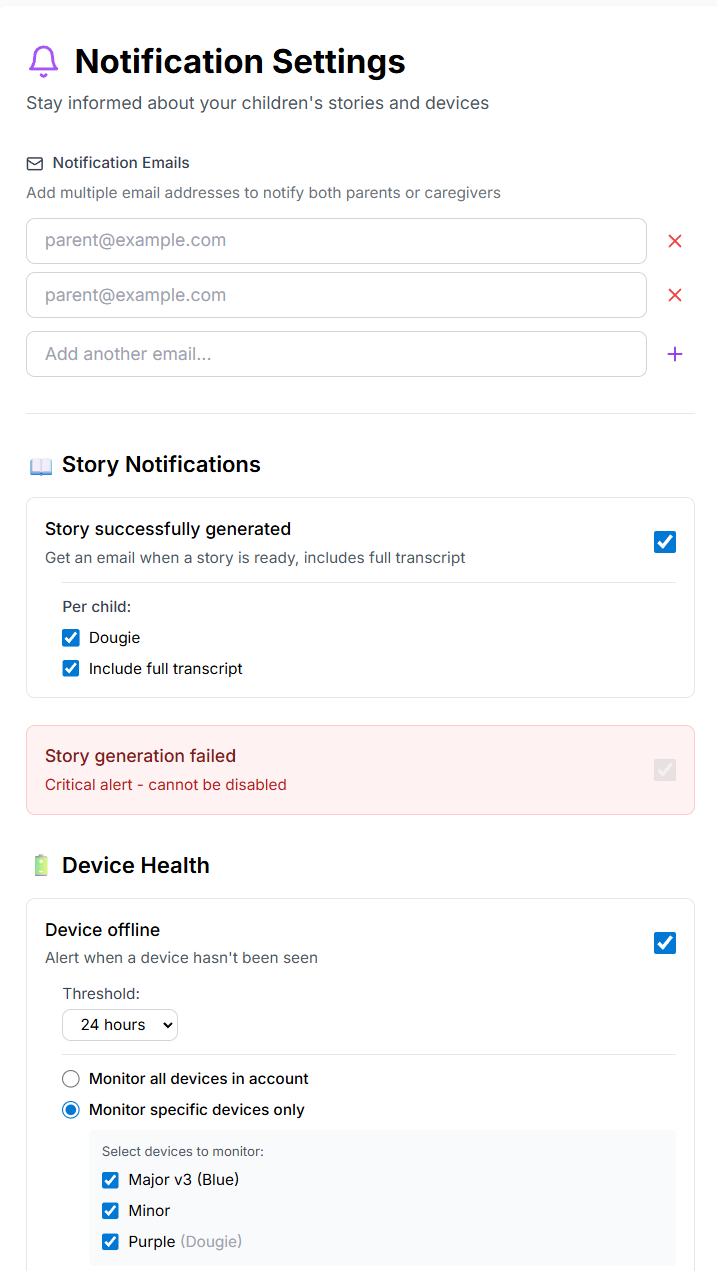
What You Can Get Notified About
Story Ready sends you a morning email with today's story summary - the title, themes, and full transcript if you want to read along or chat about it at breakfast. It also includes what news they heard and what music is playing. Useful if you want to know what your child is hearing about.
Device Offline lets you know if your child's Yoto Player disconnects from WiFi before story time, not after your child is disappointed. Gives you time to check the connection and make sure tomorrow's adventure actually arrives.
Low Battery alerts you when the battery is low before scheduled story time. Nothing worse than a story cutting off mid-adventure because the battery died. Plug it in overnight and you're sorted.
Story Failed tells you immediately if something goes wrong with story generation. This one's always on and can't be disabled - if there's a problem, you should know about it.
Multiple Recipients
Both parents can receive notifications. Add multiple email addresses and decide who gets what. Mum gets the story summary, Dad gets the device alerts, or everyone gets everything. However you want to split it.
The Defaults
We've tried to make these helpful rather than annoying:
Story summaries are off by default - opt in if you want them. Device offline and low battery are on by default because they're the ones that actually prevent problems. Story failed is always on because you should always know if something broke.
New users will see notification setup as part of the welcome wizard, so it's easy to configure from day one.
How to Turn Them On
If you're already using Daily Adventure, go to Settings then Notifications (or just visit /notifications). Add your email address, add a partner's if you want, toggle on what you want, and save. That's it.
You'll start receiving emails based on what you picked. Each email has a link to change your preferences, and you can turn them off anytime.
We only use your email for the notifications you enable. No marketing spam, no selling your data, no sharing your information.
Try It
Email notifications are available now to everyone using Daily Adventure. Whether you want to read along with your child's morning story or just have peace of mind that everything's working, it's there if you want it.
Set up notifications: dailyadventure.io/notifications